
User guide
Home · Installation · Layouts · Configuration · Platform support
Day-to-day use of Tessera: starting it, switching layouts, driving windows from the keyboard, and finding the right knob when something should behave differently. Reference material lives on other pages and is linked rather than repeated.
What Tessera is (and is not)
- Tessera is a tiling controller. It decides where windows should go and asks the window manager already running in your session to move and resize them.
- It is not a window manager. On the reference setup, Xfwm4 keeps drawing title bars, handling Alt+Tab and owning workspaces.
- The only profile with a real target is XFCE on X11 with xfwm4 4.20.0, and even that is marked
implemented-unverifiedindocs/compatibility/support-manifest.yaml. Plasma Wayland isexperimental; GNOME Wayland, macOS and Windows 11 areblocked. See Platform support before expecting anything outside XFCE/X11.
Start Tessera
| Command | What it does |
|---|---|
tessera or tessera --preferences |
Starts in preferences mode: opens the preferences window. |
tessera --autostart |
Starts the controller in the background, with no window. This is what login startup runs. |
tessera -v (--verbose, --log) |
Turns on debug logging. RUST_LOG overrides it. |
tessera -h, tessera -V |
Print usage or the version and exit. |
One controller runs per session; launching tessera again does not create a second one.
Override a few settings for one run with --tiling-enabled / --tiling-disabled, --window-margins / --no-window-margins, --window-max-count <N> and --window-margin-size <N>. They only apply to starting the app, not to debug or service commands.
Start at login
Pick one of the two methods; do not combine them.
-
XDG autostart. The shipped entry
org.xfce.Tessera-autostart.desktoprunstessera --autostartin XFCE sessions only (OnlyShowIn=XFCE). The tray’s Start at login checkbox toggles it. -
systemd user service.
tessera service install   # writes the unit; refuses to clobber a customised one
tessera service enable    # start at every graphical login
tessera service start     # start now
tessera service status    # add --json for machine-readable output
The other verbs are
stop,disable,uninstall,reloadandrestart. Tessera only touches systemd when you run one of these.
A configuration reload without a restart: systemctl --user reload tessera, pkill -HUP tessera, or the Relaunch the controller shortcut (Alt+Shift+Ctrl+Z).
Inspect what Tessera sees
These commands are headless: no window opens, and they talk to the session directly.
| Command | Use it to |
|---|---|
tessera --debug-info |
Print a report: version, locale, session, UI provider, per-operation backend availability, window manager, config path and status, monitors, desktops, windows. Add --include-apps for application names, --json for structured output. |
tessera debug windows |
List windows with ID, whether Tessera manages them and why not, floating state, class, instance and frame. --include-unmanaged adds docks, panels and dialogs; --redact-window-titles hides titles; --json is available. |
tessera debug apps |
List applications that own windows, with window counts. This is the quickest way to find the name to put in a floating rule. --include-unmanaged and --json are available. |
--debug-info and debug windows --redact-window-titles are safe to paste in a bug report. To report a problem, open an issue at https://github.com/fabioluciano/tessera/issues with that output. To watch live logs: RUST_LOG=debug tessera --autostart.
The preferences window has a Diagnostics page with the same information, a list of windows Tessera could not place, and a Copy debug info button. The tray menu has Copy report too.
Layouts and cycling
A layout decides where each tiled window goes. Tessera has 18 built in, from tall and wide to bsp and grid; pictures and descriptions are on Layouts, and you can write your own in JavaScript (Custom layouts).
- Which layouts are in the cycle is the
layoutslist intessera.yml(or the Layouts page of the preferences). The first entry is the default. Out of the box the list istall,wide,fullscreen,column. - Cycle:
Alt+Shift+Spacegoes forward,Alt+Shift+Ctrl+Spacebackward. - Jump:
Alt+Shift+Atall,Swide,Dfullscreen,Fcolumn. Any other layout can be bound asselect-<layout>-layout(see Configuration). - Main pane:
Alt+Shift+H/Lshrink or grow it;Alt+Shift+,/.change how many windows it holds.gridhas no main pane. - HUD:
Alt+Shift+Ishows the current layout on screen. - Gaps and padding come from
window-margins,window-margin-sizeandscreen-padding-*.
Keyboard shortcuts
Shortcuts are built from two modifier groups, both editable:
| Group | Default modifiers |
|---|---|
mod1 |
Alt+Shift |
mod2 |
Alt+Shift+Ctrl |
Defaults come from crates/tessera-core/src/actions.rs and crates/tessera-config/src/bindings.rs.
| Keys | With mod1 (Alt+Shift) |
With mod2 (Alt+Shift+Ctrl) |
|---|---|---|
| Space | Next layout | Previous layout |
| A, S, D, F | Select tall, wide, fullscreen, column | — |
| H, L | Shrink / grow main pane | Swap window with previous / next screen |
| , . | More / fewer main windows | — |
| J, K | Focus previous / next window | Swap with previous / next window |
| M | Focus the main window | — |
| Enter | Swap focused window with the main window | — |
| N, P | Focus next / previous screen | — |
| W, E, R, Q, G | Focus screen 1–5 | Throw focused window to screen 1–5 |
| 1 … 9, 0 | — | Throw focused window to workspace 1–10 |
| Left, Right | — | Throw focused window to the workspace on the left / right |
| T | Toggle floating for the focused window | Toggle tiling globally |
| I | Show the current layout | — |
| Z | Re-evaluate all windows | Relaunch the controller |
| X | — | Toggle focus-follows-mouse |
Actions that exist but have no default key: toggle-sticky, enable-tiling, disable-tiling, toggle-new-windows-to-main, increase-window-max-count, decrease-window-max-count, command1…command4 (forwarded to custom layouts), swap-screen-1…5, throw-space-11…16 and select-<layout>-layout for layouts other than the four above. Bind one in tessera.yml:
toggle-sticky:
  mod: mod1
  key: y
select-grid-layout:
  mod: mod2
  key: g
The full list and syntax (including false to disable a binding) are in Configuration. You can also edit the chords on the Shortcuts page of the preferences.
If XFCE or your keyboard layout already owns a combination, Tessera cannot grab it and the shortcut does nothing. Alt+Shift is a common layout-switch shortcut, and Alt+Shift+Ctrl+Left/Right collides with XFCE by default. Rebind the Tessera command; the checks are on XFCE troubleshooting.
Floating windows
A floating window keeps the position and size you give it, and the remaining windows tile around it.
| Goal | How |
|---|---|
| Float one window | Alt+Shift+T on the focused window; press again to tile it. |
| Pause tiling everywhere | Alt+Shift+Ctrl+T, or the Organize windows checkbox in the tray. |
| Always float an application | Add it to floating: in tessera.yml, or use the Rules page of the preferences (New rule). |
| Float only some windows of an application | Add window-titles: (regular expressions) to the rule. |
| Float everything except a few applications | Set floating-is-blacklist: false; the list then names the only windows that tile. |
| Float tiny windows automatically | float-small-windows: true with small-window-size (default 500). |
Find the class to put in a rule with tessera debug apps, with the Choose… and Click a window helpers on the Rules page, or with xprop WM_CLASS and a click on the window.
floating:
  - pavucontrol
  - id: Firefox
    window-titles: ["Library", "Page Info"]
Some windows are never moved regardless of rules: docks and panels, modal dialogs, fixed-size windows, and fullscreen or minimized ones. tessera debug windows shows the reason in the UNMANAGED_REASON column. The matching rules and every key are in Configuration.
Monitors and workspaces
- Each monitor is tiled using its own work area, so the XFCE panel is respected. Plugging or unplugging a monitor re-lays-out the windows.
- Move focus between screens with
Alt+Shift+N/PorW E R Q G; move a window with theAlt+Shift+Ctrlversions. - Move a window between workspaces with
Alt+Shift+Ctrl+1…0orLeft/Right. - A layout per workspace is on by default (
per-workspace-layouts: true): Tessera remembers each workspace’s layout, main-pane size and main-window count and restores them when you switch. Set it tofalseto use one layout everywhere. - Send an application to a workspace automatically with
workspace-assignments:, or on the Layouts page under Window workspace assignments. Rules apply to windows that open after the rule exists.
workspace-assignments:
  - id: Firefox
    workspace: 1        # counted from 0, so this is the second workspace
Tessera corrects only what it ordered. If the window manager refuses a placement, it retries once and then gives up, and the window appears under Problems found on the Diagnostics page. A window you move by hand is left alone. On a clean exit, windows go back to the frames they had when Tessera first saw them.
To hide title bars and borders of tiled windows, set window-decorations: hide-tiled (default keep) or use Window decorations on the General page.
Mouse
| Setting | Effect |
|---|---|
focus-follows-mouse |
The window under the pointer gets focus. Toggle live with Alt+Shift+Ctrl+X. |
mouse-follows-focus |
The pointer jumps to a newly focused window. |
mouse-swaps-windows |
Dragging a window onto another swaps their places in the layout. |
mouse-resizes-windows |
Dragging a window border keeps the new size on the next retile. |
All four are off by default and are on the Mouse page of the preferences.
Preferences
Open it with tessera, Preferences… in the tray, or the application menu.
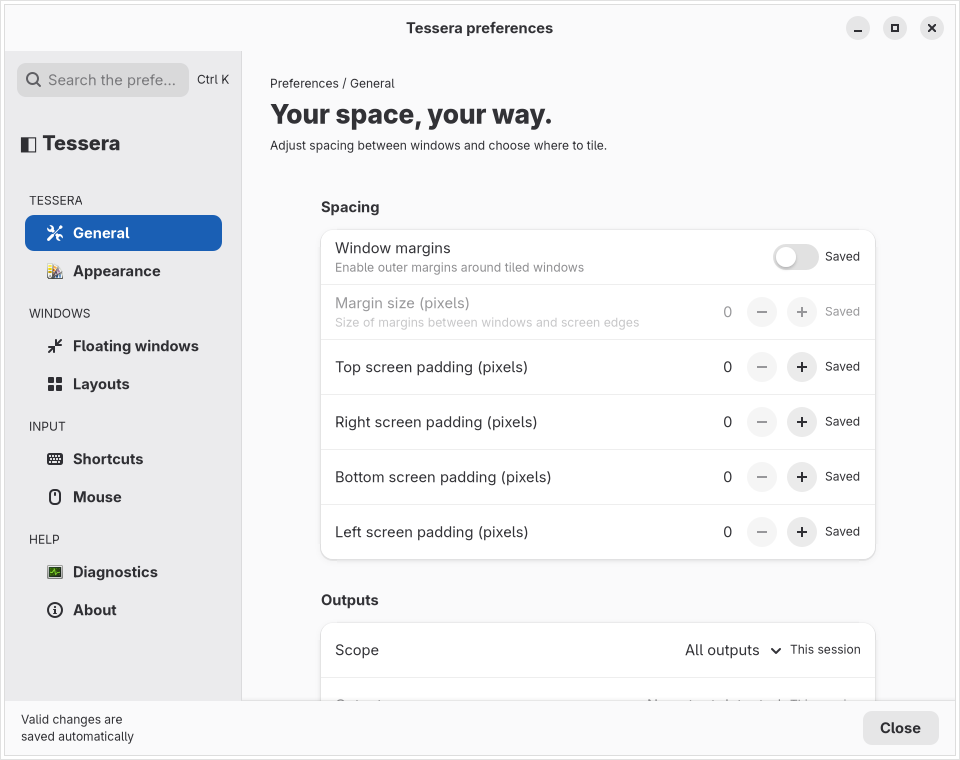
The pages are General, Appearance, Rules, Layouts, Shortcuts, Mouse, Diagnostics and About. Press Ctrl+K to search for a setting by name. Changes are written to the configuration file.
The interface language follows TESSERA_LANG, then the language key, then your locale variables; the look follows ui-style (or TESSERA_UI for one run). See Configuration.
Configuration
Settings live in a YAML file: $XDG_CONFIG_HOME/tessera/tessera.yml when that variable is an absolute path, otherwise ~/.config/tessera/tessera.yml on Linux and macOS. If the file is missing, built-in defaults are used. Unknown keys are kept, not deleted. Custom layout scripts go in layouts/*.js next to it.
Everything about keys, defaults and file layout is on Configuration.
Tray, notifications and HUD
On XFCE the tray (StatusNotifier) menu offers:
- the state, with an Organize windows checkbox
- Layout: with a submenu to pick one
- Start at login
- Preferences…, Reevaluate windows, Copy report
- Restore layouts from the configuration…, Restart Tessera, Quit Tessera
Hide the tray icon with hide-menu-bar-icon: true.
Feedback messages go through notification-style: system (desktop notifications, default) or hud (an on-screen overlay). The layout HUD is controlled by enables-layout-hud, enables-layout-hud-on-space-change, enables-window-count-hud and hud-duration-ms.
Other platforms
The repository has code for macOS and Windows backends and interfaces, and for GNOME and Plasma Wayland integrations, but per the support manifest none of them is a verified profile. Where a build has no matching provider, commands fail with one localized line on standard error and a non-zero exit status:
| Command | English message |
|---|---|
tessera, --preferences, --autostart without a UI provider |
this platform has no user interface provider |
tessera service … off Linux |
this platform does not support the requested feature |
--debug-info, debug windows, debug apps without a backend |
this desktop session has no window-management backend |
--help and --version always work. Do not rely on tiling outside XFCE/X11; check Platform support.
When something is wrong
| Symptom | Likely cause | Check | Fix |
|---|---|---|---|
| A shortcut does nothing | The combination is taken by XFCE, the keyboard layout or another app | The Shortcuts page reports collisions | Rebind the command |
| A window is not tiled | A rule, size, type or fixed size excludes it | tessera debug windows and its UNMANAGED_REASON / FLOATING columns |
Adjust the rule; see [[Configuration |
| Nothing happens at start | No window-management backend, or no display | tessera --debug-info |
Run it from the XFCE X11 session; see [[XFCE troubleshooting |
| Tessera misbehaves or restarts at login | Both XDG autostart and the systemd service start it | tessera service status and your autostart entries |
Keep only one method |
Anything not covered: open an issue at https://github.com/fabioluciano/tessera/issues and attach tessera --debug-info.